第 11 章:HAL3 入口与 CamX 初始化
本章导读
这章回答一个问题:当 CameraProvider 加载 CamX 时,第一行代码执行了什么?
从 HAL_MODULE_INFO_SYM 到 ChiContext::InitializeStaticMetadataPool(),完整的初始化链走一遍。
11.1 HAL_MODULE_INFO_SYM——一切从这里开始
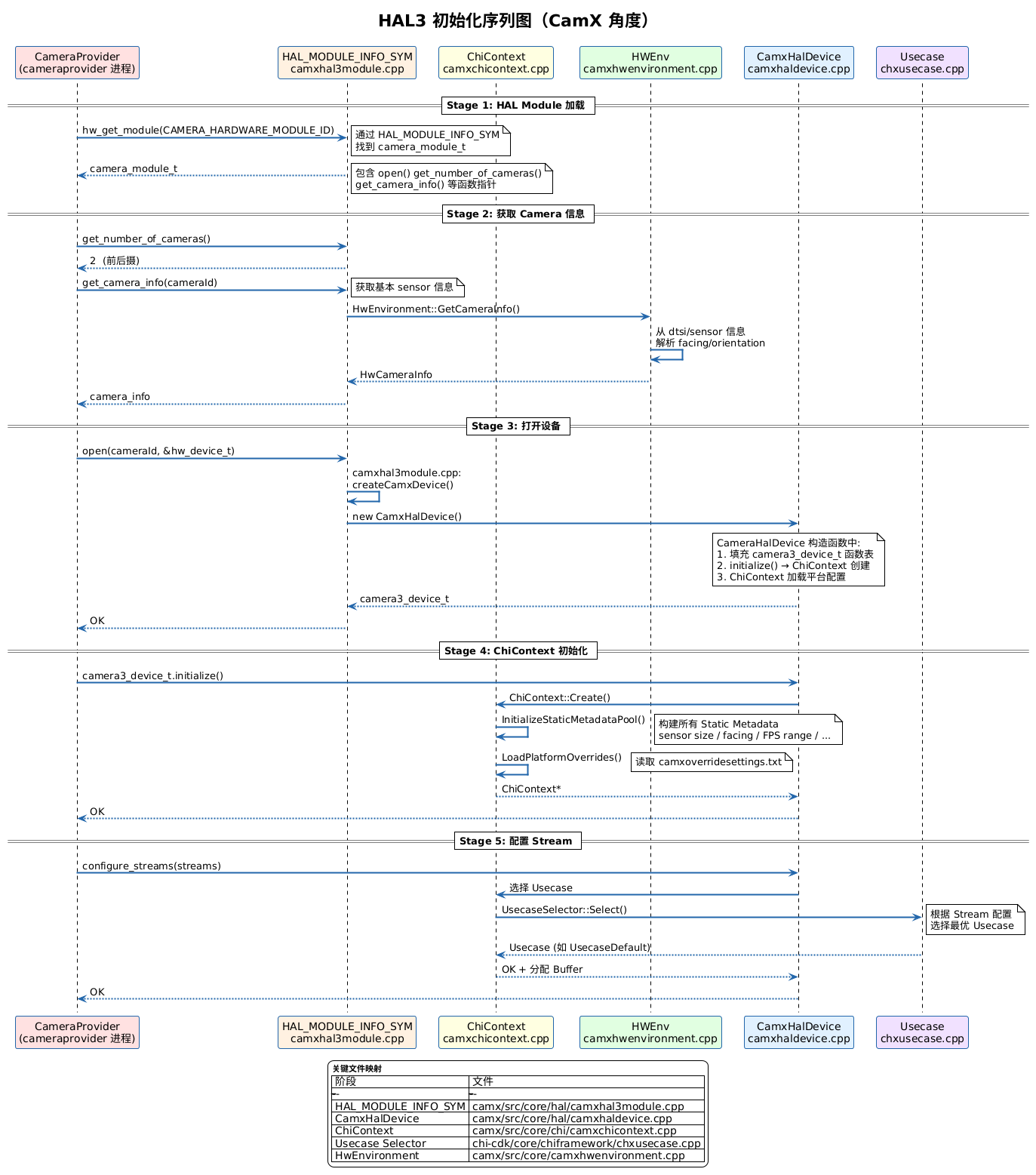
// camx/src/core/hal/camxhal3module.cpp
camera_module_t HAL_MODULE_INFO_SYM = {
    .common = {
        .id   = CAMERA_HARDWARE_MODULE_ID,  // "camera"
        .name = "Qualcomm Camera HAL3 Module",
        .methods = &g_camx_module_methods,   // 包含 open() 函数指针
    },
    .get_number_of_cameras = CamX::GetNumberCameras,
    .get_camera_info       = CamX::GetCameraInfo,
    .get_vendor_tag_ops    = CamX::GetVendorTagOps,
    .set_torch_mode        = CamX::SetTorchMode,
};
加载过程
① CameraProvider 进程启动
② hw_get_module("camera")
     ↓
③ 在 /vendor/lib/hw/camera.qcom.so 中找到 HAL_MODULE_INFO_SYM
     ↓
④ 获取 camera_module_t 的函数指针表
     ↓
⑤ 调用 get_number_of_cameras() → 知道有几个相机
     ↓
⑥ 调用 get_camera_info(0) → 后摄信息
     ↓
⑦ 调用 get_camera_info(1) → 前摄信息
11.2 camera3_device_t 的六个核心接口(HAL3.4)
这 6 个是 HAL3.4 的核心接口;HAL3.5+ 还增加了
signal_stream_flush、is_reconfiguration_required等,并非只有 6 个。
// camx/src/core/hal/camxhal3entry.cpp — 实际的 HAL3 接口注册
static camera3_device_ops_t g_camera3DeviceOps =
{
    .initialize                         = CamX::initialize,
    .configure_streams                  = CamX::configure_streams,
    .construct_default_request_settings = CamX::construct_default_request_settings,
    .process_capture_request            = CamX::process_capture_request,
    .dump                               = CamX::dump,
    .flush                              = CamX::flush,
};
| 函数 | App 层对应 | 做的事情 |
|---|---|---|
| initialize() | openCamera() | 创建 ChiContext,构建 Static Metadata |
| configure_streams() | createCaptureSession() | 选择 Usecase,创建 Pipeline,分配 Buffer |
| construct_default_request_settings() | — | 生成默认 Request 参数模板 |
| process_capture_request() | capture() | 提交处理请求 |
| flush() | Session.close() | 取消所有待处理请求 |
| dump() | dumpsys | 输出调试信息 |
11.3 ChiContext——全局上下文
ChiContext 是 CamX 中最顶层的管理对象。一个 Provider 进程只有一个。
// 伪代码
CamxResult ChiContext::Initialize() {
    // 1. 初始化 HwEnvironment——扫描传感器硬件
    m_pHwEnv = HwEnvironment::Create();

    // 2. 加载 overrides 配置
    LoadPlatformOverrides();

    // 3. 为每个 cameraId 构建 Static Metadata
    for (UINT32 i = 0; i < numCameras; i++) {
        InitializeStaticMetadataPool(i);
    }

    // 4. 初始化 CSL(与 Kernel 通信)
    CSLInitialize();

    // 5. 加载 tuning 文件
    InitializeTuningManager();
}
InitializeStaticMetadataPool
这个函数构建了 App 端 CameraCharacteristics 能读到的所有静态信息:
CamxResult ChiContext::InitializeStaticMetadataPool(UINT32 cameraId) {
    HwCameraInfo* pCameraInfo = m_pHwEnv->GetCameraInfo(cameraId);

    // Facing(前后摄)
    LensFacingValues lensFacing;
    switch (pCameraInfo->imageSensorFacing) {
        case ImageSensorFacingBack:  lensFacing = LensFacingBack;  break;
        case ImageSensorFacingFront: lensFacing = LensFacingFront; break;
        case ImageSensorFacingExternal: /* USB 摄像头 */ break;
    }
    SetMetadataByTag(LensFacing, &lensFacing, 1);

    // Orientation(旋转角度)
    SetMetadataByTag(SensorOrientation, &pCameraInfo->imageOrientation, 1);

    // Sensor 能力
    SetMetadataByTag(SensorInfoActiveArraySize, &sensorSize, 1);
    SetMetadataByTag(SensorInfoExposureTimeRange, &expRange, 1);
    SetMetadataByTag(ControlAEAvailableModes, &aeModes, numAeModes);
    // ...
}
11.4 Facing/Orientation 的判定逻辑 ⭐
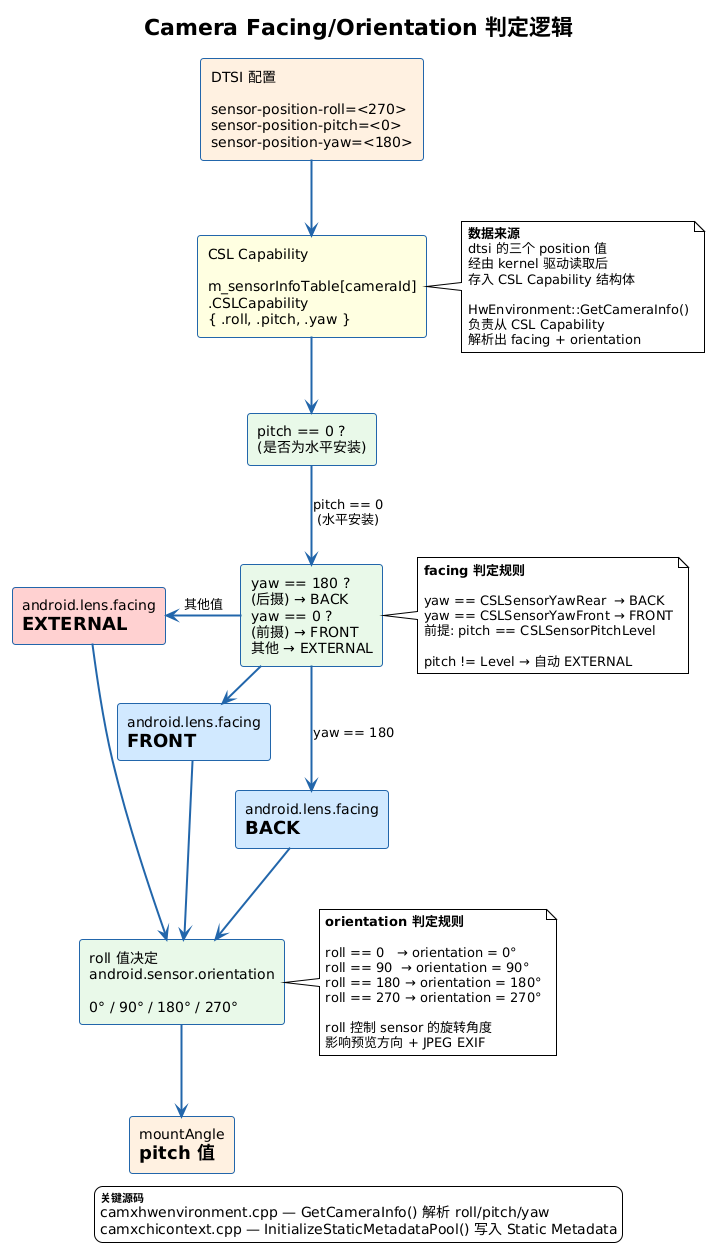
数据链路
dtsi 文件
  sensor-position-roll  = <90>
  sensor-position-pitch = <0>
  sensor-position-yaw   = <180>
    ↓
Kernel 驱动读取 → CSL Capability
    ↓
HwEnvironment::GetCameraInfo()
  └─ 用 pitch + yaw 判断 facing
  └─ 用 roll 判断 orientation
    ↓
ChiContext::InitializeStaticMetadataPool()
  └─ lensFacing 写入 Static Metadata
  └─ orientation 写入 Static Metadata
    ↓
App 侧: CameraCharacteristics.get(LENS_FACING)
                              .get(SENSOR_ORIENTATION)
源码级走读
// camx/src/core/camxhwenvironment.cpp
CamxResult HwEnvironment::GetCameraInfo(
    UINT32 cameraID, HwCameraInfo* pCameraInfo) const
{
    UINT32 roll  = m_sensorInfoTable[cameraID].CSLCapability.roll;
    UINT32 pitch = m_sensorInfoTable[cameraID].CSLCapability.pitch;
    UINT32 yaw   = m_sensorInfoTable[cameraID].CSLCapability.yaw;

    // 默认: EXTERNAL(USB 摄像头)
    pCameraInfo->imageSensorFacing = ImageSensorFacingExternal;

    if (CSLSensorPitchLevel == pitch) {
        // pitch=0 → 水平安装(手机摄像头)
        if (CSLSensorYawFront == yaw) {
            pCameraInfo->imageSensorFacing = ImageSensorFacingFront;
        } else if (CSLSensorYawRear == yaw) {
            pCameraInfo->imageSensorFacing = ImageSensorFacingBack;
        }
    }

    // orientation 由 roll 决定
    switch (roll) {
        case CSLSensorRoll0:   pCameraInfo->imageOrientation = 0;   break;
        case CSLSensorRoll90:  pCameraInfo->imageOrientation = 90;  break;
        case CSLSensorRoll180: pCameraInfo->imageOrientation = 180; break;
        case CSLSensorRoll270: pCameraInfo->imageOrientation = 270; break;
    }
}
roll/pitch/yaw 的含义
roll(横滚):  sensor 绕着光轴旋转 → android.sensor.orientation
pitch(俯仰): sensor 前后倾斜 → 0 表示水平安装(手机)
yaw(偏航):   sensor 朝向 → 0=前摄,180=后摄

手机典型配置:
  后摄: roll=90,  pitch=0, yaw=180
  前摄: roll=270, pitch=0, yaw=0
💡 一个常见的配置错误
如果 dtsi 中忘了配 roll/pitch/yaw,默认全为 0。
- pitch=0 → 水平安装(判断为手机摄像头)
- yaw=0 → FRONT(前摄)
- 后摄被识别成了前摄!
症状:App 中打开后摄,出来的画面方向不对。
排查:adb shell dumpsys media.camera | grep -E "facing|roll|pitch|yaw"
11.5 本章总结
HAL_MODULE_INFO_SYM — HAL 加载的唯一切入点
camera3_device_t — 3 个核心接口: initialize / configure_streams / process_capture_request
ChiContext — 全局上下文,构建 Static Metadata
Facing/Orientation — 来自 dtsi 的 roll/pitch/yaw → 经过 GetCameraInfo() → 写入 Metadata

排查 facing 问题的路线:
  dtsi → dmesg → GetCameraInfo() → Static Metadata → dumpsys